18 June, 2022

MS Excel Keyboard Shortcuts


MS Excel Keyboard Shortcuts:-


To create a new workbook
Ctrl+N
to open workbook 
Ctrl+O
to save a workbook 
Ctrl+S
To see the print preview of the sheet 
Ctrl+F2
To print a worksheet
Ctrl+P
to close excel 
Alt+F4
to bold
Ctrl+B
to italicize
Ctrl+I
to underline 
Ctrl+U
to go to the next worksheet 
Ctrl+Page Down
to go to the previous worksheet
Ctrl+Page Up
to find in a worksheet 
Ctrl+F
to replace in a worksheet
Ctrl+H
To convert cell to date format
Ctrl+Shift+#
To convert cell to currency format
Ctrl+Shift+&
To convert cells to percentage format
Ctrl+Shift+%
To convert cell to time format
Ctrl+Shift+@
to make a chart 
F11
to refresh the sheet 
F9
Go To command to open
Ctrl+G

Important parts of MS Excel

Important parts of MS Excel:-

What is Work Book in Excel?  

An Excel file is called a workbook. A workbook can comprise many worksheets. In other terms, a workbook is a collection of worksheets. A maximum of 255 worksheets can be added or designed in a workbook of Excel.

What is a Worksheet in Excel? 

The worksheet is the most essential part of MS Excel, which we see only when opening MS Excel, there is a sheet that is created up of rows and columns, all the work is done in this worksheet itself, you can choose any number or letter in this worksheet. When you type in Excel for the first time, by default three worksheets are opened which are shown as Sheet-1 Sheet-2, and Sheet-3... 

What is Raw in Excel?

Horizontal Block in Excel is called Raw Raw is displayed in Excel by 1,2,3 Maximum number of raws can come in an excel sheet is 1048576, it rises from top to bottom

What are Columns in Excel? 

In Excel, Vertical Block is called the Column, it is displayed from A, B, C, and D. Currently, the maximum number of columns in Excel 2019 is 16384, these columns are from left to right in Excel. 

What are cells in Excel?  

A cell in Excel means the place where a row and column meet or intersect. An” is a Column and “1” is Raw 

What is Formula in Excel? 

You also type a value in the cell of Excel, and a special formula is typed to add, subtract, and divide it, in which there is a special sequence of Cell references, Values, and Functions that gives the result according to the values ​​in Excel. A formula always starts with = (equal) 

Features of MS Excel

     Features of MS Excel:-


  • The User Interface of MS Excel is exceptionally simple, Microsoft has designed it so that any individual can go into business by taking the fundamental course in MS Excel.
  • This is the world's most believed Spread Sheet Program, without this PC information is deficient, and complex estimations should be possible effectively with the use of MS Excel, on the off chance that you have learned MS Excel once, you will definitely find a job someplace.
  • The structure of MS Excel is something like this in which you get computerized tables made, there is a clear reason need to make tables, you open excel and you can begin data entry.
  • MS Excel Formulas Make The Work Easier If You Have Basic Knowledge Of Excel Formulas Then Many Hours Of Work Can Be Done In Minutes With The Help Of Excel Formulas Which Are Auto Updated Also
  • In MS Excel, one seat to another and one record to another can likewise be connected, regardless of the amount of data you maintain, Excel will deal with it.
  • You Can Create Automatic Charts And Dashboard Through MS Excel

20 May, 2022

How to insert a file path and file name into Word 2007?


How to Insert a file path and file name into Word 2007? 

the steps of inserting the file path in the footer are different, let's find out 

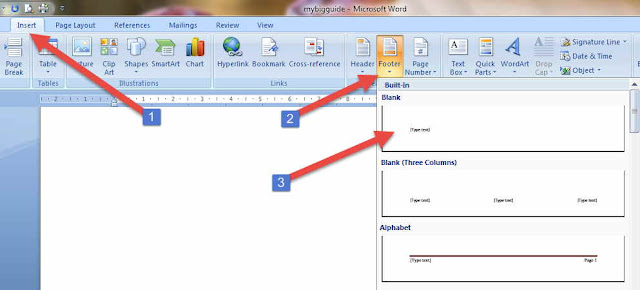
  • You can insert a path in any new or old file so, you click on the Insert tab.
  • Here go to the Header and Footer area. Here Choose Footer and select Blank.


  • When you select Blank, Blank Field will become a footer on the page. In Which Type of text will be written. You can type anything here whatever you want. 
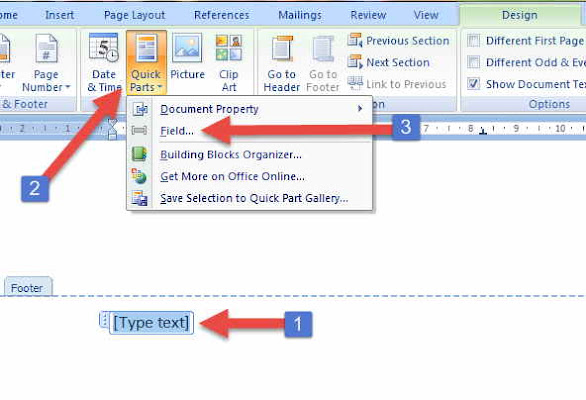
  • But we have to set an automatic file path here. So, click on this Blank Field with the mouse, and the Design tab will appear in the ribbon, here Quick Parts will appear, click on this, and now select the field from the menu. 

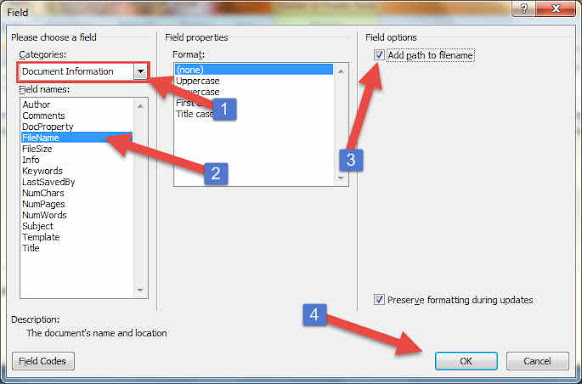
  • A window will open as you select the field, where you have to choose Document Information from the Categories dropdown menu. Also, the file name has to be chosen from the box given below.
  • After this tick, the check box is given in the field options Add path to the filename. 


  • Then tick OK, this is how you can insert the file path in the footer in Word 2007. It looks like this below


  • After this, keep this file anywhere, the path of that place will automatically change and you will see it in the footer.

06 May, 2022

How To Use SUM formula in MS Word


How To Use SUM Formula in MS Word?

SUM in the table in MS WORD, AVERAGE, COUNT, MAX, MIN formula can also be used, let's know how to apply SUM formula in MS WORD also Super Tips.

  • Click on the cell in whichever table you like to apply the SUM formula.
  • Now press Ctrl + F9 from the keyboard
  • By doing this, {} Bracket will come in that cell-like this 
  • Now in the middle of these {} brackets you have to type the SUM formula, something like this 
  • If you like to SUM from top to bottom then you have to type =SUM(ABOVE) 
  • Thus if you like to SUM from top to bottom then type =SUM(BELOW)
  • And if you like to SUM the row given on the left then type =SUM(LEFT)
  • If you keep any changes in the table after doing SUM, then the formula is not updated automatically like in Excel. To update the formula, you need to right-click on the cell containing the SUM and choose the Update field or Ctrl + F9 from the keyboard. Have to press, even this gets the Formula Updated 
  • Like LEFT, RIGHT, ABOVE, BELOW are used with SUM formula, MS WORD you can also use AVERAGE, COUNT, MAX, MIN, PRODUCT, SUM with LEFT, RIGHT, ABOVE, BELOW.